-চাকরির-বিজ্ঞপ্তি-পোস্ট-করা-যায়.png)
ব্লগ বিস্তারিত
How to Write a Job Application Email? Complete Guide for Job Seekers

Super Admin
|আগ 2 2026
|0 মন্তব্য
Visit: www.tap2jobs.com
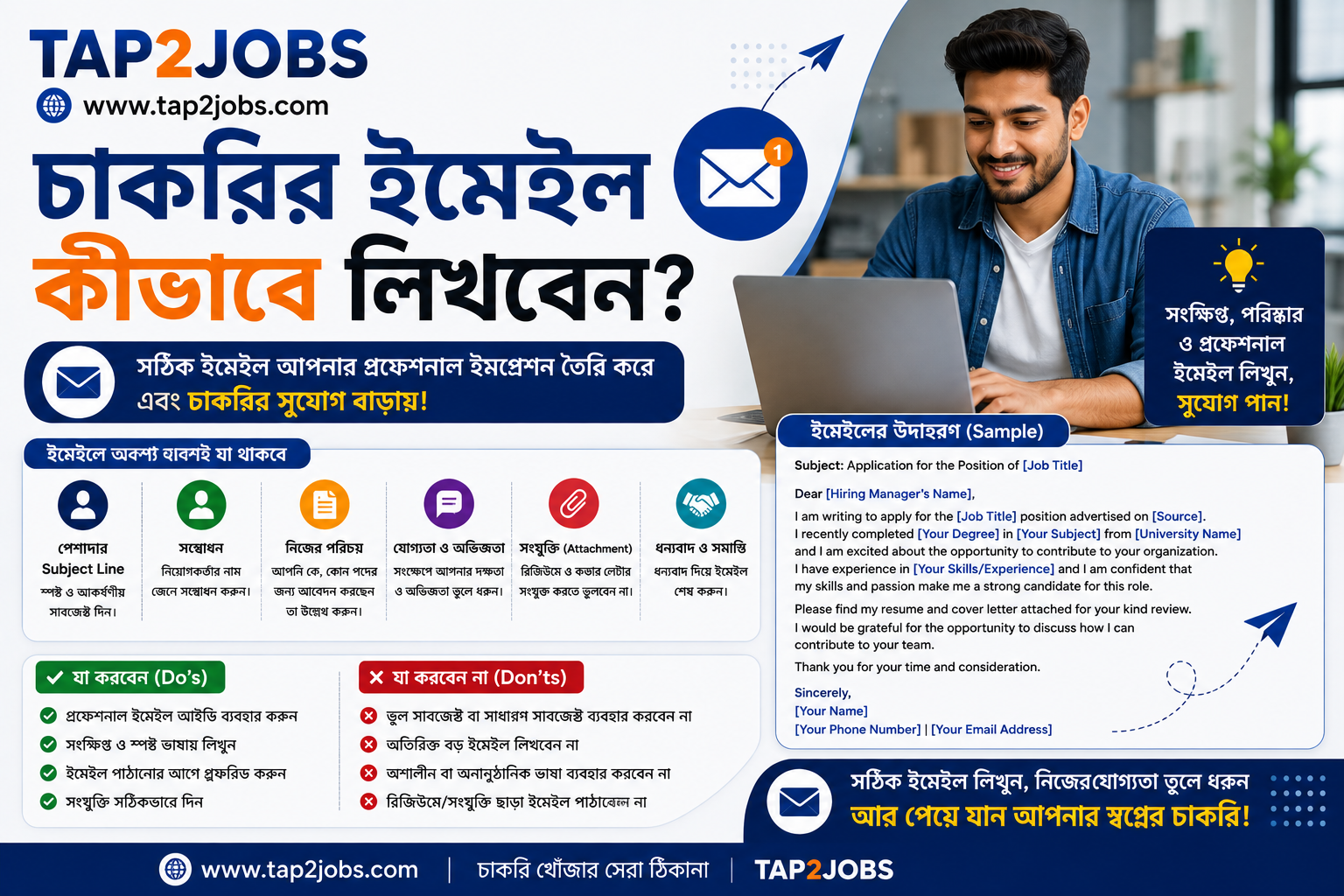
How to Write a Job Application Email? Complete Guide for Job Seekers
A professional Job Application Email can create a strong first impression when applying for a job. Many employers accept CVs and applications through email, making it important for job seekers to know how to write a clear, concise, and professional email.
A well-written job application email should include an appropriate Subject Line, professional greeting, brief introduction, relevant qualifications, attachment details, and a professional closing.
In this complete guide, you will learn how to write a job application email, what to include, how to write the perfect subject line, common mistakes to avoid, and practical job application email samples.
What Is a Job Application Email?
A Job Application Email is an email sent to an employer or recruitment team to apply for a specific job position. It usually includes your CV, Cover Letter, and other required documents.
Your email is often one of the first points of contact between you and an employer. Therefore, it should be professional, relevant, easy to read, and free from spelling or grammatical errors.
What Should a Job Application Email Include?
A professional job application email generally includes:
-
A clear and professional Subject Line
-
Appropriate Greeting
-
Short Introduction
-
Job Position You Are Applying For
-
Relevant Skills and Experience
-
Mention of Attached Documents
-
Professional Closing
-
Contact Information
How to Write a Job Application Email
1. Use a Professional Email Address
Your email address should look professional and preferably include your real name.
Good examples:
Avoid email addresses such as:
A professional email address helps create a more appropriate first impression.
2. Write a Clear Job Application Email Subject Line
The Job Application Email Subject Line should immediately tell the recruiter why you are contacting them.
Examples:
-
Application for Accounts Executive Position
-
Application for Software Engineer
-
Job Application – Marketing Executive
-
Application for HR Officer – Ref: HR-2026-15
Avoid vague subject lines such as:
-
CV
-
Job
-
Hello
-
Need Job
-
Please Hire Me
3. Start With a Professional Greeting
If you know the recruiter's or hiring manager's name, use it.
Example:
Dear Mr. Rahman,
If you do not know the person's name, you can use:
Dear Hiring Manager,
or
Dear Recruitment Team,
4. Introduce Yourself Briefly
Start your email by mentioning your name, the position you are applying for, and where you found the vacancy.
Example:
I am writing to apply for the position of Accounts Executive, which I found advertised on TAP2JOBS. With my educational background in accounting and relevant skills, I am interested in applying for this position.
Keep the introduction short and relevant.
5. Explain Why You Are a Suitable Candidate
Use the second paragraph to briefly highlight your most relevant:
-
Skills
-
Work Experience
-
Education
-
Training
-
Projects
-
Achievements
Do not copy your entire CV into the email. Mention only the qualifications that are relevant to the position.
6. Mention Your CV and Other Attachments
Clearly mention the documents attached to your email.
Example:
Please find my CV and Cover Letter attached for your review. I would appreciate the opportunity to discuss my qualifications further.
Before clicking Send, make sure every required attachment is actually attached.
7. End With a Professional Closing
A simple professional closing is usually sufficient.
Example:
Thank you for your time and consideration.
Sincerely,
Rahim Hasan
Phone: +8801XXXXXXXXX
Email: rahim.hasan@gmail.com
Job Application Email Sample
Subject: Application for the Position of Accounts Executive
Dear Hiring Manager,
I am writing to apply for the position of Accounts Executive, which was advertised on TAP2JOBS.
I have completed my Bachelor's degree in Accounting and possess skills in Microsoft Excel, ERP software, and financial reporting. I am eager to contribute to your organization through my dedication, willingness to learn, and strong teamwork skills.
Please find my CV and Cover Letter attached for your review. I would be grateful for the opportunity to discuss my qualifications in an interview.
Thank you for your time and consideration.
Sincerely,
Rahim Hasan
Phone: +8801XXXXXXXXX
Email: rahim.hasan@gmail.com
What Documents Should You Attach?
Depending on the job advertisement, you may need to attach:
-
CV / Resume
-
Cover Letter
-
Academic Certificates
-
Experience Certificate
-
Portfolio
-
Other documents specifically requested by the employer
Always follow the instructions provided in the job advertisement.
How to Name Your CV File Professionally
Your file name should be simple and easy for recruiters to identify.
Recommended:
-
Rahim_Hasan_CV.pdf -
Rahim_Hasan_Cover_Letter.pdf -
Portfolio_Rahim_Hasan.pdf
Avoid:
-
CV New.pdf -
Final CV.pdf -
cv123.pdf -
My Resume Latest Final Final.pdf
Common Job Application Email Mistakes
Avoid these common mistakes when sending a job application email:
-
Forgetting to attach your CV
-
Leaving the Subject Line blank
-
Making spelling or grammatical errors
-
Writing an unnecessarily long email
-
Sending exactly the same email to every employer
-
Using the wrong company name
-
Using an unprofessional email address
-
Using informal or inappropriate language
-
Sending files in formats that were not requested
10 Important Job Application Email Tips
-
Keep your email concise and relevant.
-
Use professional language.
-
Customize the email for each job.
-
Write the company and position name correctly.
-
Check spelling and grammar before sending.
-
Use PDF format for your CV unless another format is requested.
-
Use a professional email signature.
-
Make the Subject Line specific.
-
Check all attachments before clicking Send.
-
If appropriate, send a polite follow-up after 5–7 business days.
How to Increase Your Chances of Getting an Interview
A professional email alone cannot guarantee an interview, but you can make your application more relevant by:
-
Following the requirements in the Job Description
-
Customizing your CV
-
Highlighting relevant skills
-
Including a Cover Letter when appropriate
-
Keeping your LinkedIn Profile updated
-
Using a professional email address
-
Writing clearly and concisely
-
Following the employer's application instructions
Job Application Email Checklist
Before sending your application, check the following:
✅ Correct Subject Line
✅ Correct Company Name
✅ Correct Job Position
✅ CV Attached
✅ Cover Letter Attached, if required
✅ Spelling and Grammar Checked
✅ Professional Email Address
✅ Professional Signature
✅ All Required Documents Attached
Should You Follow Up After Sending a Job Application?
If the employer has not provided a specific timeline, you may send a polite follow-up email after approximately 5–7 business days.
Keep the follow-up short and professional. Avoid sending repeated emails within a short period.
Frequently Asked Questions About Job Application Emails
How long should a Job Application Email be?
A job application email should generally be concise. Around 150–200 words is a useful guideline, although the appropriate length depends on the job and application instructions.
Should I send my CV as a PDF?
Yes. PDF is generally a professional format for submitting a CV unless the employer specifically requests another format.
Should I attach a Cover Letter?
If the employer requests a Cover Letter, attach one according to the instructions. If it is not required, you can include a brief introduction in the email itself.
What should I write in the Job Application Email Subject Line?
Mention the position clearly. For example:
Application for Marketing Executive Position
If a job reference number is provided, you can include it as well.
Can I use the same Job Application Email for every company?
It is better to customize your email for each position. Mention the correct company name, job title, and relevant qualifications.
When should I follow up after applying?
If no response timeline is provided, a polite follow-up after approximately 5–7 business days can be appropriate.
Conclusion
Writing a professional Job Application Email is an important part of the modern job search process. Your email should be clear, concise, relevant, and customized for the position you are applying for.
Before sending your application, check the Subject Line, company name, job title, spelling, attachments, and contact information carefully.
A professional email, a well-prepared CV, and a relevant application can help you present your qualifications clearly to potential employers.
For more job search resources, career advice, and employment opportunities in Bangladesh, visit TAP2JOBS.COM.
Visit: www.tap2jobs.com
বিভাগ :
সম্পর্কিত ক্যারিয়ার নিবন্ধ
সব নিবন্ধ দেখুন















মন্তব্য (0)